In this episode, Bryan talks with Keith Jones about ThinManager internationally. They discuss training, challenges and opportunities that exist for those outside the US when incorporating ThinManager and Rockwell into their projects and facilities.
More and more industrial manufacturers are realizing the benefits of using thin client computing technology to run their modern facilities. We recently had the chance to speak with Thanh Phan from Quantum Solutions about how they used ThinManager to build out a new food production facility in the Midwest.
When one of the world’s largest food and beverage companies wanted to open a new processing plant in Davenport, Iowa, they called on their partners at Rockwell Automation to help them design and implement a modern, connected workspace.[...]
ThinManager training has made great strides in the past year by adding what we call the “Mr. Demo” demonstration kit to the mix. Mr. Demo is a preconfigured server loaded with a ThinManager install and paired with some peripherals like a thin client, card reader and web camera to quickly illustrate some of the awesome functionality of ThinManager. This kit has made it easier and more consistent for partners and staff to demonstrate and train with ThinManager.
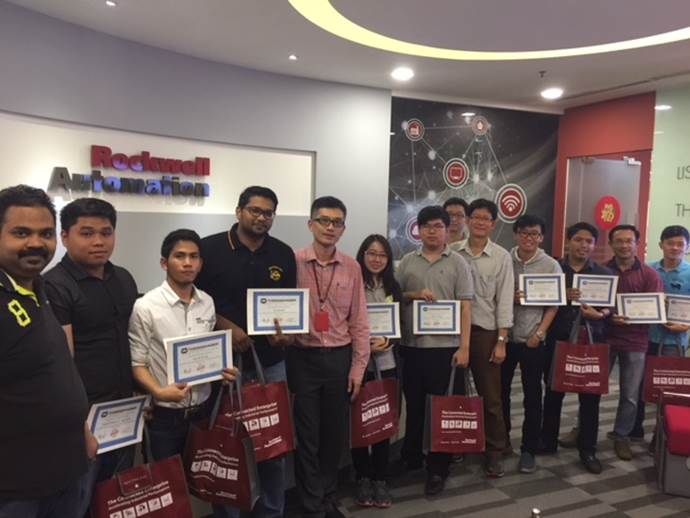
The Rockwell team in Southeast Asia Architecture & Software decided they wanted some training and went above and beyond to make it happen. Satish Basa and Anukoon Asawachatroj assembled a group of System Integrator trainees in Malaysia looking to become ThinManager certified. Satish took the initiative to procure enough Mr. Demo kits from Australia to facilitate the training. Over a two day span they successfully trained 10 attendees to become certified ThinManager integrators in Malaysia. Many people worked diligently to make this happen and in a remarkably efficient and effective way.[...]
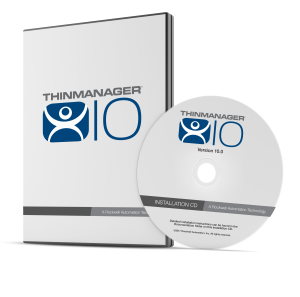
ThinManager 10 is full of new features to make life easier from the administrator to the end user. This version puts a focus on security and productivity and we are ready to tell about some of these exciting new features. Let’s take a look at what’s new.
Authentication Passthrough (productivity)
A successful login into a ThinManager terminal will now pass a security token into FactoryTalk Security, and any running session(s) of FactoryTalk View SE on that terminal will automatically take that security token to log in the associated user. For instance, if you have multiple sessions being delivered to a terminal in a control room environment, this will dramatically simplify the login process.[...]
Rockwell Automation has just released its open-architecture industrial computers and it first line of thin client hardware (+ software) with the VersaView 5000 portfolio. Why is this important for you? Solutions Architect Vinod Anandarajah highlighs a few reasons in this episode:
1.) Flexible & Scalable Options – You can choose between Windows 7 and 10, screen sizes ranging from 12 to 21 inches, as well as integrated display and non-display computers.
2.) Improved Safety, Security, Productivity – With ThinManager’s content delivery management system, there is a software layer for these thin clients. You now have the ability to secure content based on the user, device, or location.[...]
Learn about all the new features in the latest release of ThinManager. We talk about Single Port TFTP, Terminal Server Grouping, Authenticated Email, SMS Messaging, USB Cameras, Virtual Screens, VNC Support and much more!
Layout custom-sized screens on a single monitor with ThinManager.
Virtual Screens are defined using the Display Client Configuration Wizard. It is launched by selecting the Display Client icon at the bottom of the ThinManager tree, right clicking on the Virtual Screen branch, and selecting Add Display Client.
For a step-by-step guide on how to add Virtual Screens to your ThinManager configuration, flip to page 166 in the ThinManager Version 9 User Guide.
April 25, 2016 marks the release of ThinManager Platform 9.
ThinManager is a software solution for automation networks that enable secure, centralized confi guration and deployment of applications and content to every PC, thin client, mobile device and user. ThinManager® increases safety and security through powerful visualization and authentication features allowing you to reduce your maintenance and downtime by simplifying the management of all devices and users.
You can also go mobile with ThinManager’s built-in mobility solution, Relevance®—the only location-based mobile management platform that allows applications and content to be securely delivered to specifi c locations within your facility and nowhere else.[...]
Automation Control Products Releases ThinManager® 9.0—Includes Virtual Screens with Session Scaling Allowing Customized Visualization Management
For release April 25, 2016
Alpharetta, GA — ACP releases ThinManager 9.0 as a major release of the ThinManager platform. Version 9.0 contains many new features including Virtual Screens as one of the most powerful tools for providing custom visualization. Virtual Screens allows administrators to lay out work screens in custom-sized regions on a single monitor. Add in automatic session scaling and you don’t even have to recode an application to get it to fit the area of the screen you assign it to. ThinManager also supports 4K resolution so a single monitor can now be used in place of multiple monitors—saving on hardware costs and reducing the effort of wiring and mounting.[...]